Dorkinians Website V3
Aug 2025 - Jan 2026
Category:Personal Design
 GitHub
Used in 22 projects
 Netlify
Used in 16 projects
 Heroku
Used in 3 projects
 Google Apps Script
Used in 3 projects
 Google Sheets
Used in 8 projects
 Neo4j
Neo4jUsed in 5 projects
 Neo4j Aura
Used in 3 projects
 Snyk
SnykUsed in 16 projects
 Umami
UmamiUsed in 3 projects
 Zustand
Used in 1 project
 Playwright
Used in 2 projects
 Jest
JestUsed in 2 projects
 YAML
YAMLUsed in 1 project
 npm
npmUsed in 5 projects
 Typescript
Used in 9 projects
 Markdown
Used in 5 projects
 Cursor
Used in 8 projects
CypherUsed in 4 projects
 Google Maps
Used in 1 project
 Google Cloud
Used in 3 projects
 NextAuth
Used in 2 projects
 Next.js
Used in 6 projects
 Express.js
Used in 3 projects
 Tailwind CSS
Used in 4 projects
 Node.js
Used in 6 projects
 React
ReactUsed in 16 projects
 Uptime Robot
Used in 2 projects
 Testing Library
Used in 1 project
Description
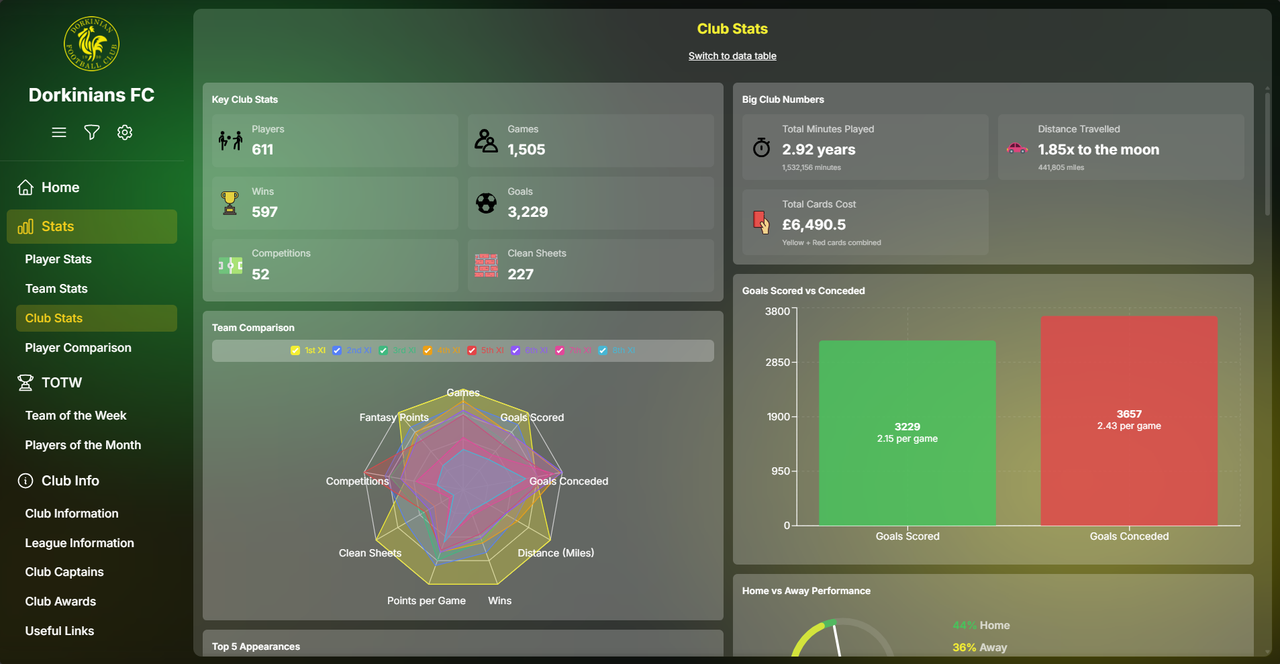
Building on the foundations of the previous Dorkinians Website, the new site aims to provide deeper analysis of the available stats and clearer display across player, team and club statistics for Dorkinians FC.
Serving over 600 players, it is built as a PWA, allowing a more native experience with a chatbot key feature for users to ask questions to.
The app provides a far more detailed analysis of the club's stats, built upon a graph database using Neo4j.
Umami analytics are used on the site to record and monitor user behaviour to discover pain points and new feature ideas.
Serving over 600 players, it is built as a PWA, allowing a more native experience with a chatbot key feature for users to ask questions to.
The app provides a far more detailed analysis of the club's stats, built upon a graph database using Neo4j.
Umami analytics are used on the site to record and monitor user behaviour to discover pain points and new feature ideas.
North Star Metric
Increase the number of users learning more about their stats and league position
Lessons Learned
One of the lessons learned was learning how to deal with Netlify's 30 second timeout limit for functions, where my initial script was timing out on every run. Splitting the database seeding code out into Heroku and optimising the script run time was sufficient to get the script up working remotely with email notifications and job id tracking for status updates. I learned how to test and check memory build ups to avoid crashes within the Heroku limit I was working within and set up an Admin dashboard within the site for job monitoring and triggering.
I also learned how to set up a PWA to work across iOS and Android mobile devices and feel like a native app, whilst working on desktop as well.
To make the chat bot work, I utilised test driven development, defining the tests for questions and answers expected and then developing the chat bot logic from that.
For the table data, I discovered the FA Site to have a very good bot detection system but an awful API for developers to use and so automating the data updates was a pain point I had to use an external ScraperAPI service for.
In the frontend, I was able to implement skeleton loaders and optimise data fetching orders to prioritise important visible data to users to make the app feel fast and efficient.
After completing development, I learned how to set up E2E testing for both mobile and desktop versions of the app using Playwright, automating a weekly test through GitHub Actions. Setting up the tests after the majority of development was also a lesson learned that I will take into my next project to write the tests before I start coding.
I later implemented a green/blue strategy for the seeding data, instead of having downtime of data during the seeding process and tested out using feature flags to control the process of release of a suite of new features I had added.
I also learned how to set up a PWA to work across iOS and Android mobile devices and feel like a native app, whilst working on desktop as well.
To make the chat bot work, I utilised test driven development, defining the tests for questions and answers expected and then developing the chat bot logic from that.
For the table data, I discovered the FA Site to have a very good bot detection system but an awful API for developers to use and so automating the data updates was a pain point I had to use an external ScraperAPI service for.
In the frontend, I was able to implement skeleton loaders and optimise data fetching orders to prioritise important visible data to users to make the app feel fast and efficient.
After completing development, I learned how to set up E2E testing for both mobile and desktop versions of the app using Playwright, automating a weekly test through GitHub Actions. Setting up the tests after the majority of development was also a lesson learned that I will take into my next project to write the tests before I start coding.
I later implemented a green/blue strategy for the seeding data, instead of having downtime of data during the seeding process and tested out using feature flags to control the process of release of a suite of new features I had added.
Developed For
Dorkinians FC
Project Links: